
How to update
Your work and photos travel with the update. Follow these steps to open the new configurator and put your updated website online.
Update your configurator
- In your purchased configurator, click Update. It saves a copy of your current work, including photos, before sending your licence key.
- In the confirmation window, click Download. Your work is included as
my-website.jsonin the same ZIP as the new configurator. - If your browser does not save the ZIP automatically, click Save ZIP.
- Unzip the downloaded ZIP. The folder contains the new
configurator.htmland yourmy-website.json. - Double-click the new
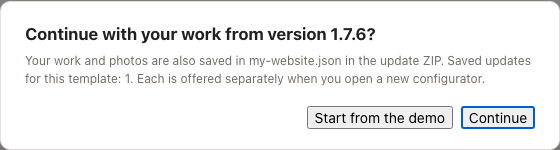
configurator.htmlto open it. You can close the old configurator. - When it asks Continue with your work from version …?, click Continue. Your text, photos and settings return. Check any message about settings that could not be loaded. If the question does not appear, follow the steps below.
- When you are happy with the result, click Download the finished website.
- Upload the
webfolder from the website download to your hosting in place of the old one. See Get your site online for hosting instructions.
Keep your settings file
Keep my-website.json from the update ZIP. It contains your work and photos, even if browser memory is unavailable. Choosing Start from the demo asks for confirmation and discards only the browser handoff; it keeps the file in your ZIP. Closing the question keeps the handoff.
If the question doesn't appear
A different browser, a private window or unavailable browser memory may prevent the question from appearing. The file in your ZIP still works.
- Open the new
configurator.html. - Click Load in the bar at the top.
- Choose
my-website.jsonfrom the unzipped update folder.
The configurator loads the same settings and photos as Continue and tells you about any settings it could not load. Your existing configurator and website keep working.